# Version 0.21.0

## Release Notes

We're happy to introduce our latest product iteration, version 0.21.0.&#x20;

It brings exciting new features and improvements, let's dive into them!

### Segmentation

Without any doubt the biggest item of this release is segmentation support. Use it to get a better understanding of model performance for individual segments of your population and figure out which segments are responsible for model performance deteriorating.\
\
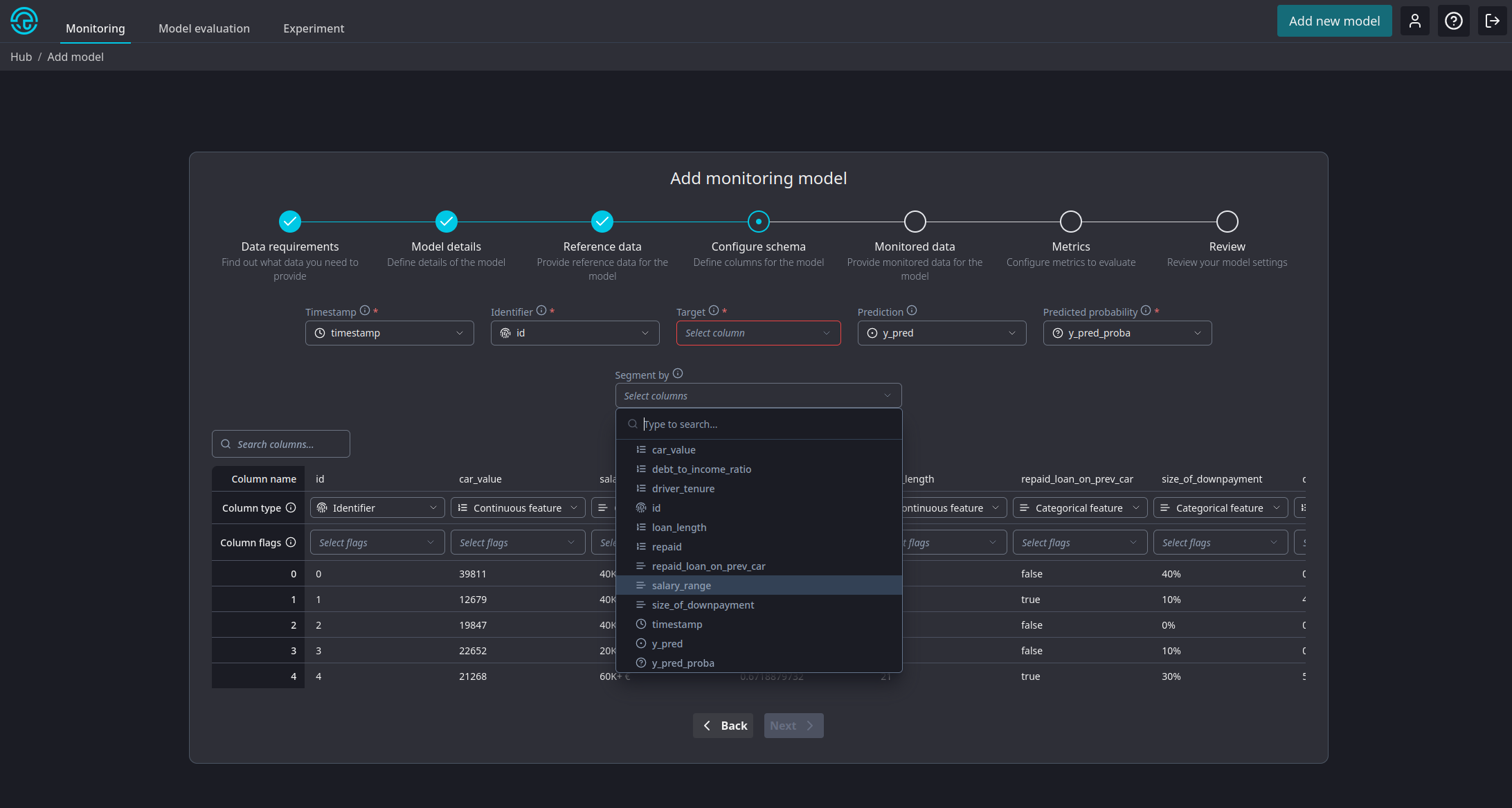
To enable segmentation on a new model, assign the *Segmentation* flag to the column in the model creation wizard. NannyML will create a segment for each distinct value within that column. Multiple columns can be marked for segmentation.\ <br>

<figure><img src="https://content.gitbook.com/content/XHZtmbIWCoRBaGjIyKin/blobs/gHLPVyD0rfctRFKBrwlX/Screenshot_20240715_112621.png" alt=""><figcaption><p>Marking a column as a segment source</p></figcaption></figure>

*Note: we currently don't support adding segments to previously created models. It can only be enabled for new models.*

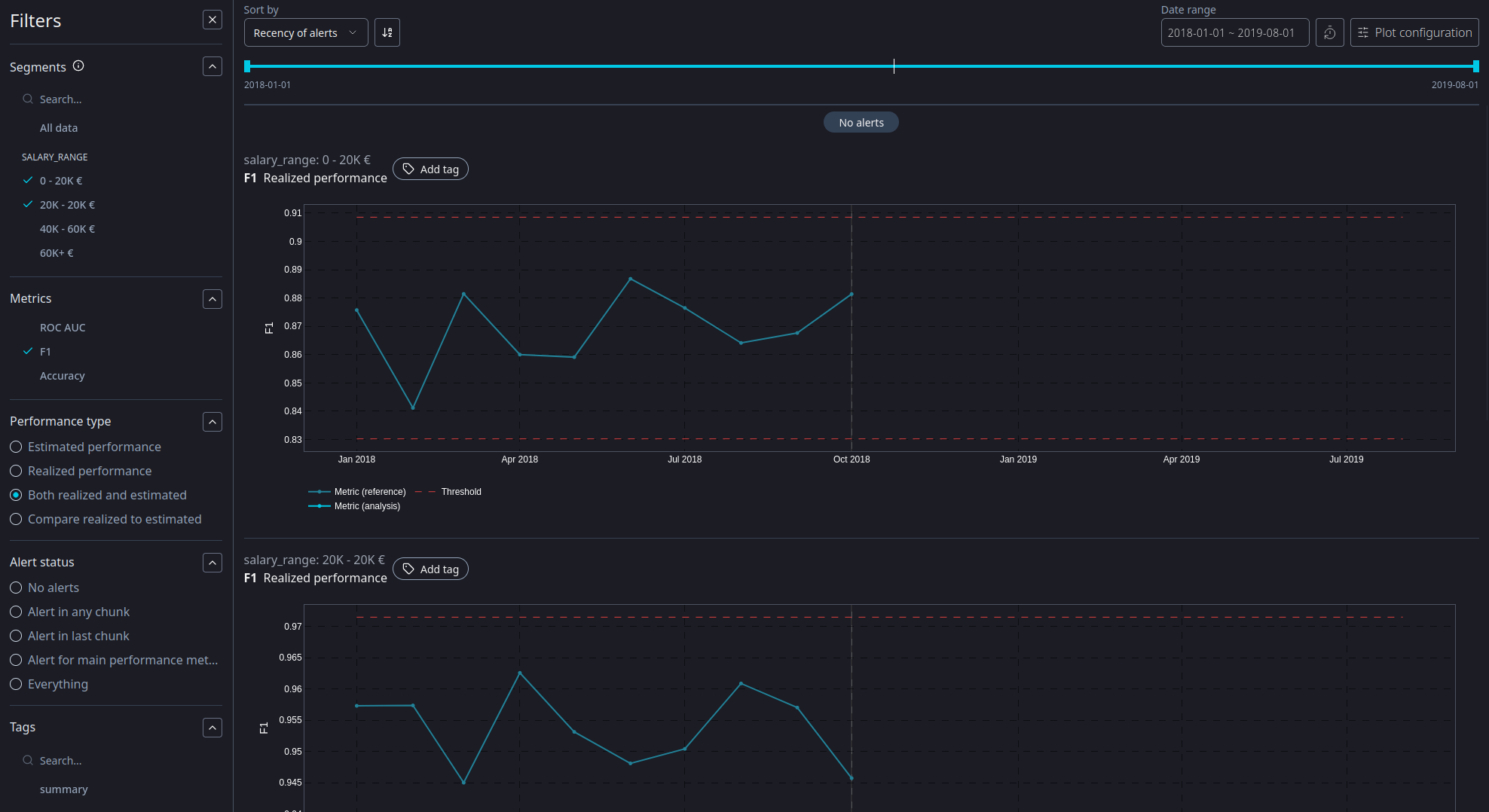
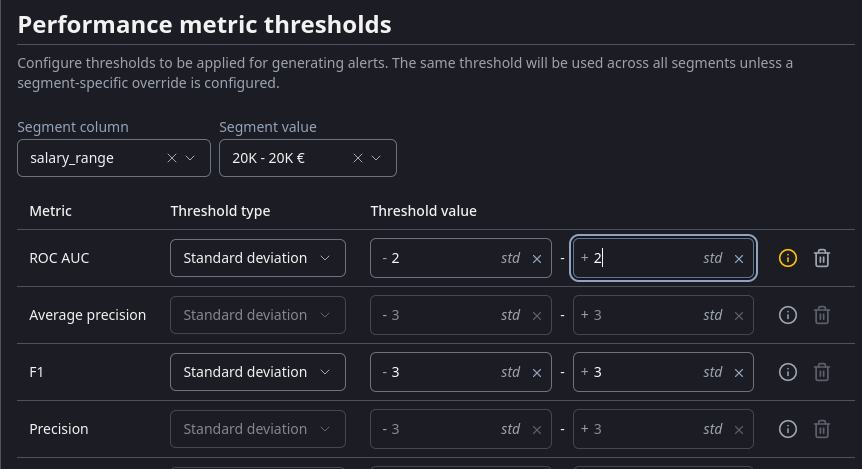
All calculated metrics will be available for the full, unsegmented datasets as well as all individual segments. Every segment can have it's own thresholds too! Each page allows you to filter on every segment value. You can even add individual segment results to the model summary page!\ <br>

<figure><img src="https://content.gitbook.com/content/XHZtmbIWCoRBaGjIyKin/blobs/UDva5YXmgVUgGXy6ePru/Screenshot_20240715_112828.png" alt=""><figcaption><p>Applying segment filters</p></figcaption></figure>

This was a long requested feature with big engineering implications. We're stoked to finally release it into your hands!

### Revamped monitoring model creation wizard

The wizard to create a new monitoring model is one of the oldest pieces in our cloud product. A lot has changed since it was released and we felt now was the time to revisit this part of the product.

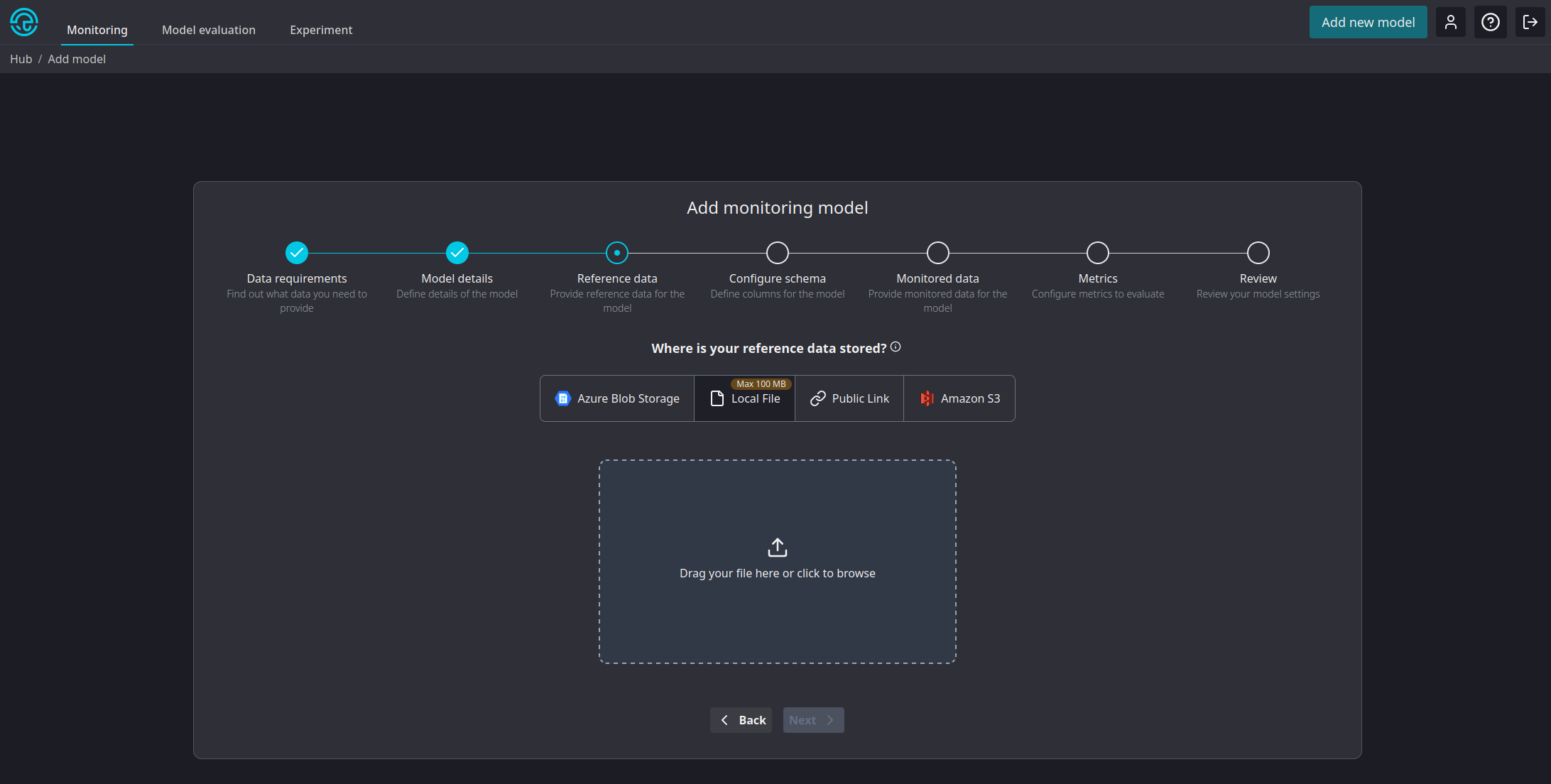
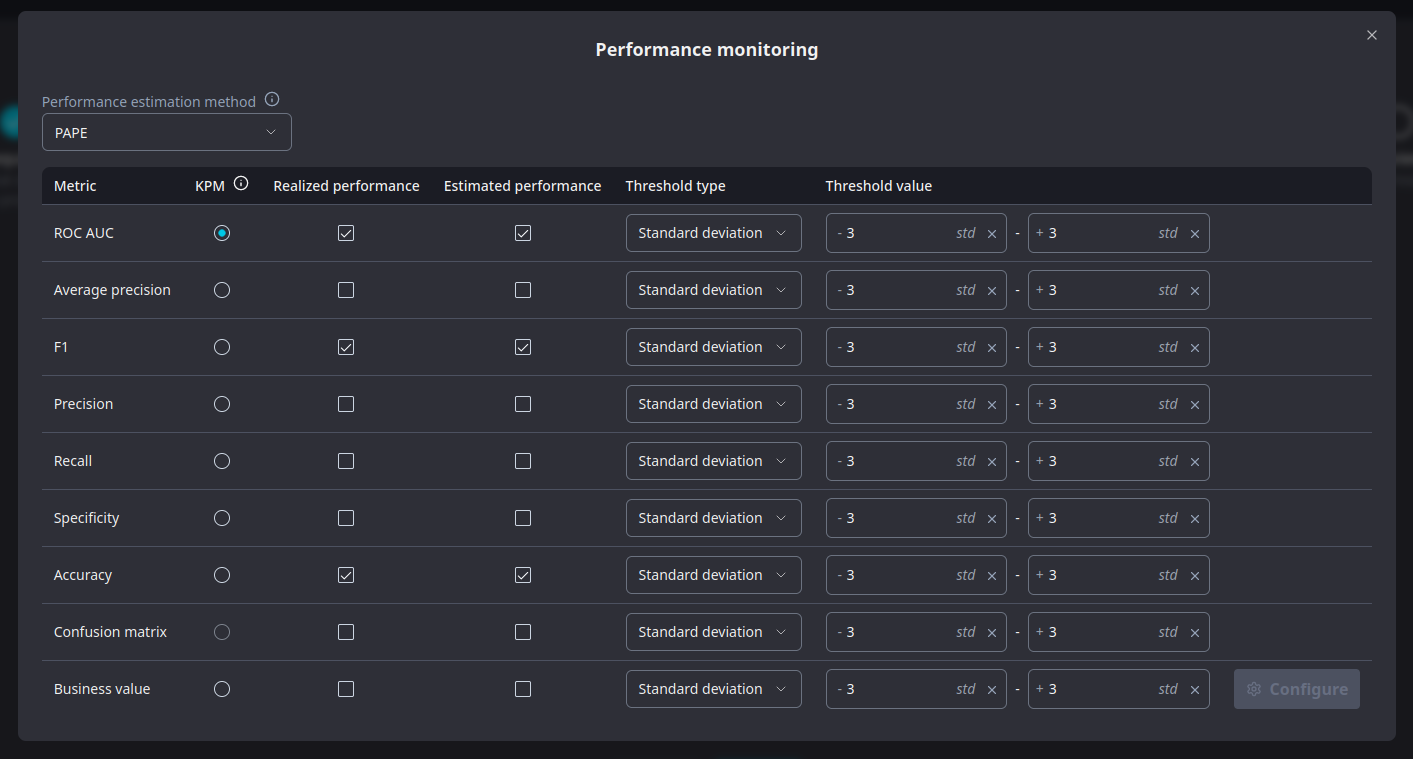
This latest iteration brings a new look , consistent with other wizards in our cloud product. But the changes run deeper than looks alone! It is now possible to configure the individual metrics and their thresholds for your model straight from the wizard. NannyML Cloud will provide you with a set of defaults tailored to the data you have available. You can then tweak this default configuration to your liking.&#x20;

<figure><img src="https://content.gitbook.com/content/XHZtmbIWCoRBaGjIyKin/blobs/8HWFc1sv7qiQI2FeKO7j/Screenshot_20240715_124717.png" alt=""><figcaption><p>Selecting data sources, very fancy!</p></figcaption></figure>

<figure><img src="https://content.gitbook.com/content/XHZtmbIWCoRBaGjIyKin/blobs/OoV12Wp2rpBdtSRwsNAe/Screenshot_20240715_124827.png" alt=""><figcaption><p>Configuring performance metrics during model creation</p></figcaption></figure>

*Note: we currently don't support configuring metrics when creating a monitoring model using the SDK.*\
\
These changes bring a lot of consistency and improved usability to the product. We hope you enjoy them as much as we do.

### New multivariate drift detection method: domain classifier

The domain classifier has been in our open source library for a while, but now we've added it to our cloud product. \
\
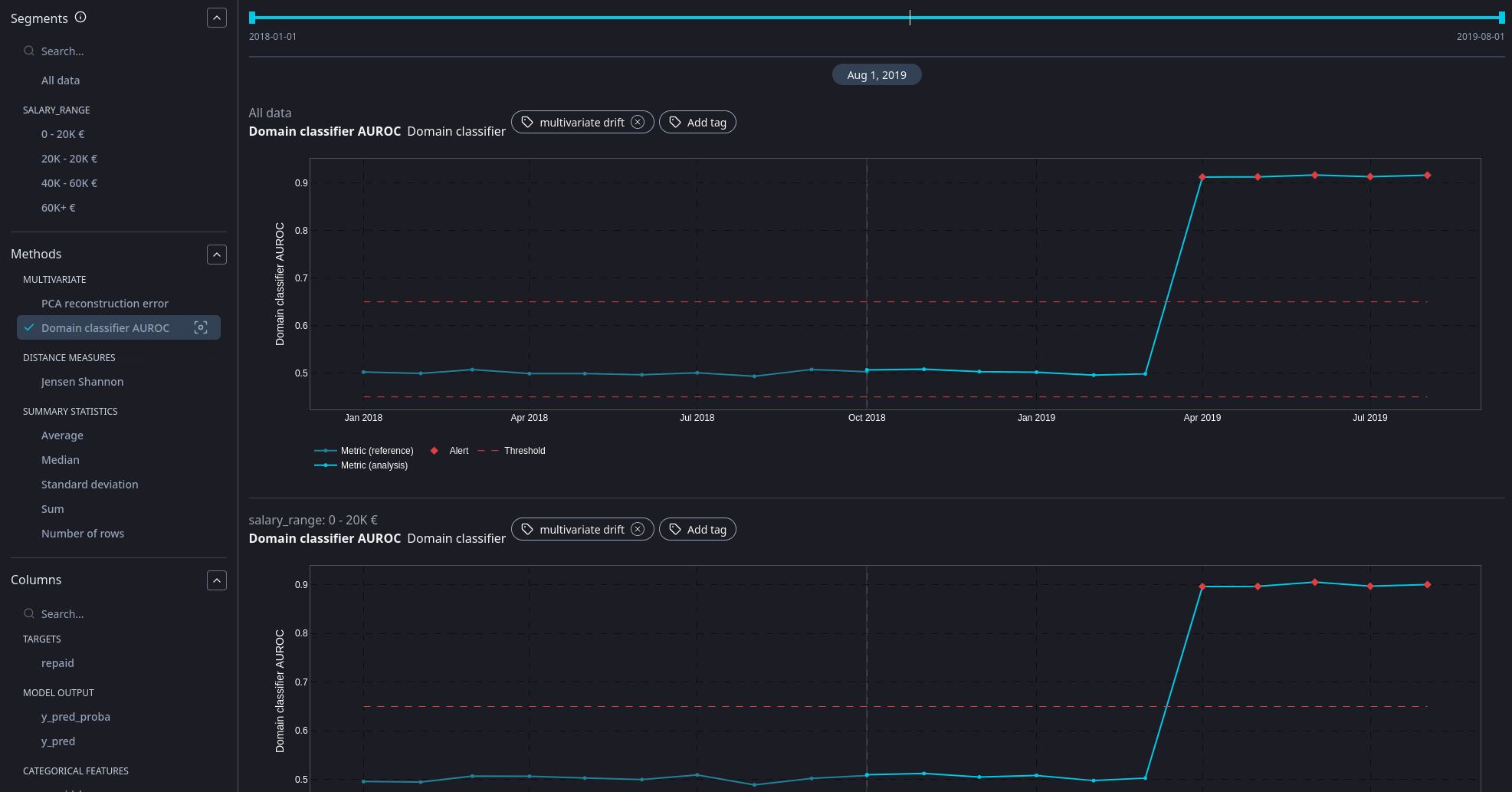
The gist of the method is this: we train a model classify data as "originating from the reference data set" or from the analysis data set. We then look at the AUROC score of that classifier. A low value means it is hard to discern the origin: reference and analysis data are still similar. A high value means it it is easy to discern the origin: reference and analysis data are drifting apart.&#x20;

<figure><img src="https://content.gitbook.com/content/XHZtmbIWCoRBaGjIyKin/blobs/e6Vrgd8zMuQxgkQqvMZx/Screenshot_20240715_125003.png" alt=""><figcaption><p>Multivariate drift detection with the domain classifier  method</p></figcaption></figure>

You can read more about the method in our [OSS documentation](https://nannyml.readthedocs.io/en/stable/how_it_works/multivariate_drift.html#domain-classifier).

### Adjustable thresholds without recalculation

Whilst we did offer variable, configurable thresholds within NannyML Cloud, the process for applying (and evaluating) them always required a recalculation of metrics. In this latest version we've split up that process so the dynamic part of the threshold evaluation happens outside of the metric calculation. This allows you to (re)configure your thresholds and see the result in the web application instantaneously.

<figure><img src="https://content.gitbook.com/content/XHZtmbIWCoRBaGjIyKin/blobs/a1d7SA0BvABZPwjtzUVe/image.png" alt=""><figcaption><p>Look ma, no recalculation!</p></figcaption></figure>

### Speedups and UX

As we continue to invest into our cloud product, we keep striving for a better user experience. We've been working on some remarks from your (most welcome) feedback.

* Renamed M-CBPE to PAPE for the sake of consistency. More terminology changes are to occur soon!
* Clicking on the navigation tab headers will now take you to the respective hub page, as expected.
* Redesigned the edit summary modals.
* Renamed *main performance metric* to *key performance metric*.
* Implemented a lazy loading mechanism for the summary and all result pages
* Rewrote a lot of the API queries and handlers to reduce server response times and minimize traffic sent over the wire.

And last, but not least, we've been combing through our calculation libraries with our profiler and were able to achieve some impressive speedups (up to 300% - or 3 times faster for PCA). You can read all about it in our [dedicated blog post](https://www.nannyml.com/blog/speed-up-ml-monitoring-library-optimizations)!\ <br>

## Changelog

### Server

#### Changed

* Replaced the `segment` `ColumnType` with a flag for a `Column`. This way columns that define segments can still be used in the actual monitoring.
* Replaced custom `NaN` handling by letting `orjson` handle it.
* Performance upgrades for result loading.
* Renamed MCBPE to PAPE.
* Segments are now displayed alphabetically in any segment filters.
* Only disable RCD calculation when there is no target column for the reference dataset. Missing analysis targets will no longer disable RCD calculation and not result in an error.
* Extract threshold calculation from monitoring runner. We no longer report calculated thresholds in the monitoring results, but only the `mean` and `std` of reference results.

#### Fixed

* Fix updating model chunking in settings breaking monitoring runs.
* Fix running a calculator even when all of its metrics are disabled
* Fix "product updates" in AWS getting blocked because the existing license cannot be released (new pod fails to start due to missing license, old pod can never release it).
* Fix closing database connections on errors.
* Handle missing values or thresholds in notifications.
* Fix left join order in timescale data queries
* Fix metric config generation for business value
* Use `method` for Multivariate Drift configurations
* Fix incorrect limits from performance metrics after splitting up their configuration.
* Fix broken updates for metric configurations.
* Deal with `None` values when evaluating thresholds. These are a result of `np.Nan` values reported back to the server.

#### Added

* Extend the GraphQL API to allow filtering KPM metrics for a list of segments.
* Added support to query the version numbers of the product and components via the GraphQL API.
* Added support for multivariate drift calculation using Domain Classifier.
* Added support for segmentation.

### Web

#### Changed

* Replaced the `segment` `ColumnType` by column flags. This still allows a segment defining column to be used for monitoring.
* Make settings `edit` buttons sticky, so they are always on visible.&#x20;
* UX improvements for result plots.
* Make 'view logs' button sticky in the monitoring logs view, so it is always visible.
* Only show the key performance metric for "all data", not all segments, on the summary page.
* Lazy load result plot data in monitoring result view and summary.
* Renamed M-CBPE to PAPE.
* Updated some title in the performance metrics settings page, to remove confusion.
* Clicking on the tab header will now take you to the respective hub page.
* Optimized and redesign the model monitoring summary, by using more efficient queries and redesigning the edit summary modals.
* Separated threshold calculation from runs. Runs now only return `std` and `mean` of reference metric values.

#### Fixed

* Fixed broken filter functionality still using `main` tags instead of using the actual `kpm` model property.
* Removed experimental "display on hover" for metric card buttons.
* Fixed incorrect lower threshold evaluation in metric cards on the model summary page.
* Fixed overflow issue when model name exceeds available space in the navigation pane.
* Fixed overflow issue when data source paths exceed available space in the review of new model wizard.
* Fixed issue with displayed row count in settings pages after uploading data.

#### Added

* Added an error screen to inform the user about a missing license, as the product now support startup without an 0active license.
* Added version information about all components to the Help page.

### Monitoring runner

#### Changed

* Bumped version of NannyML  Premium to `0.4.1`
* Bumped version of NannyML OSS to `0.10.7`
* Improved performance of result exports
* No longer report threshold values but `mean` and `std` of reference results

#### Fixed

* Fixed issues caused by Pydantic 2 changes of default behavior
* Fixed issues caused by changes in SQLAlchemy API

#### Added

* Added support for the domain classifier multivariate drift method.
* Added support for segmentation by moving the `Runner` implementation to the premium library

### NannyML OSS

#### Changed

* Optimized summary stats and overall performance by avoiding unnecessary copy operations and index resets in during chunking [(#390)](https://github.com/NannyML/nannyml/issues/390)
* Optimized performance of `nannyml.base.PerMetricPerColumnResult` filter operations by adding a short-circuit path when only filtering on period. [(#391)](https://github.com/NannyML/nannyml/issues/391)
* Optimized performance of all data quality calculators by avoiding unnecessary evaluations and avoiding copy and index reset operations [(#392)](https://github.com/NannyML/nannyml/issues/392)
* Make predictions optional for performance calcuation. When not provided, only AUROC and average precision will be calculated. [(#380)](https://github.com/NannyML/nannyml/issues/380)
* Small DLE docs updates
* Combed through and optimized the reconstruction error calculation with PCA resulting in a nice speedup. [(#385)](https://github.com/NannyML/nannyml/issues/385)
* Updated summary stats value limits to be in line with the rest of the library. Changed from `np.nan` to `None`. [(#387)](https://github.com/NannyML/nannyml/issues/387)<br>

#### Fixed

* Fixed an issue in the Wasserstein "big data heuristic" where outliers caused the binning to cause out-of-memory error. [(#393)](https://github.com/NannyML/nannyml/issues/393)
* Fixed a typo in the `salary_range` values of the synthetic car loan example dataset. `20K - 20K €` is now `20K - 40K €`. [(#395)](https://github.com/NannyML/nannyml/issues/395)
* Fixed a breaking issue in the sampling error calculation for the median summary statistic when there is only a single value for a column. [(#377)](https://github.com/NannyML/nannyml/issues/377)
* Drop `identifier` column from the documentation example for reconstruction error calculation with PCA. [(#382)](https://github.com/NannyML/nannyml/issues/382)
* Fix an issue where default threshold configurations would get changed when upon setting custom thresholds, bad mutables! [(#386)](https://github.com/NannyML/nannyml/issues/386)

### NannyML Premium

#### Changed

* Big refactors and speedups for  RCD and PAPE
* Renamed M-CBPE to PAPE
* Catch and handle exceptions during concept model training in RCD

#### Fixed

* Allow RCD to run without analysis targets (but still with reference targets)

#### Added

* Added support for segmentation by implementing a new `Runner` that supports segmented runs.

### Evaluation runner

#### Changed

* Implemented rounding rules for HDI and ROPE values

### Experiment runner

#### Changed

* Implemented rounding rules for HDI and ROPE values