# Version 0.23.0
## Release Notes
We're proud to bring our latest 0.23.0 release!
We've worked hard on a new product feature that is unlocking huge potential within NannyML Cloud: custom metrics!
### Custom metrics support
NannyML Cloud includes a suite of performance metrics, but sometimes your use case requires a very specific one. The newly added support for custom metrics allows you to provide us with an implementation of your very own metric, so we can plug it into our algorithms for performance calculation and estimation. We support custom metrics for binary classification, multiclass classification and regression models.
If you are already monitoring models using NannyML Cloud, you can easily add new custom metrics to the monitoring workflow! \
\
In the custom metrics overview, you can create a new custom metric.
Custom metrics overview
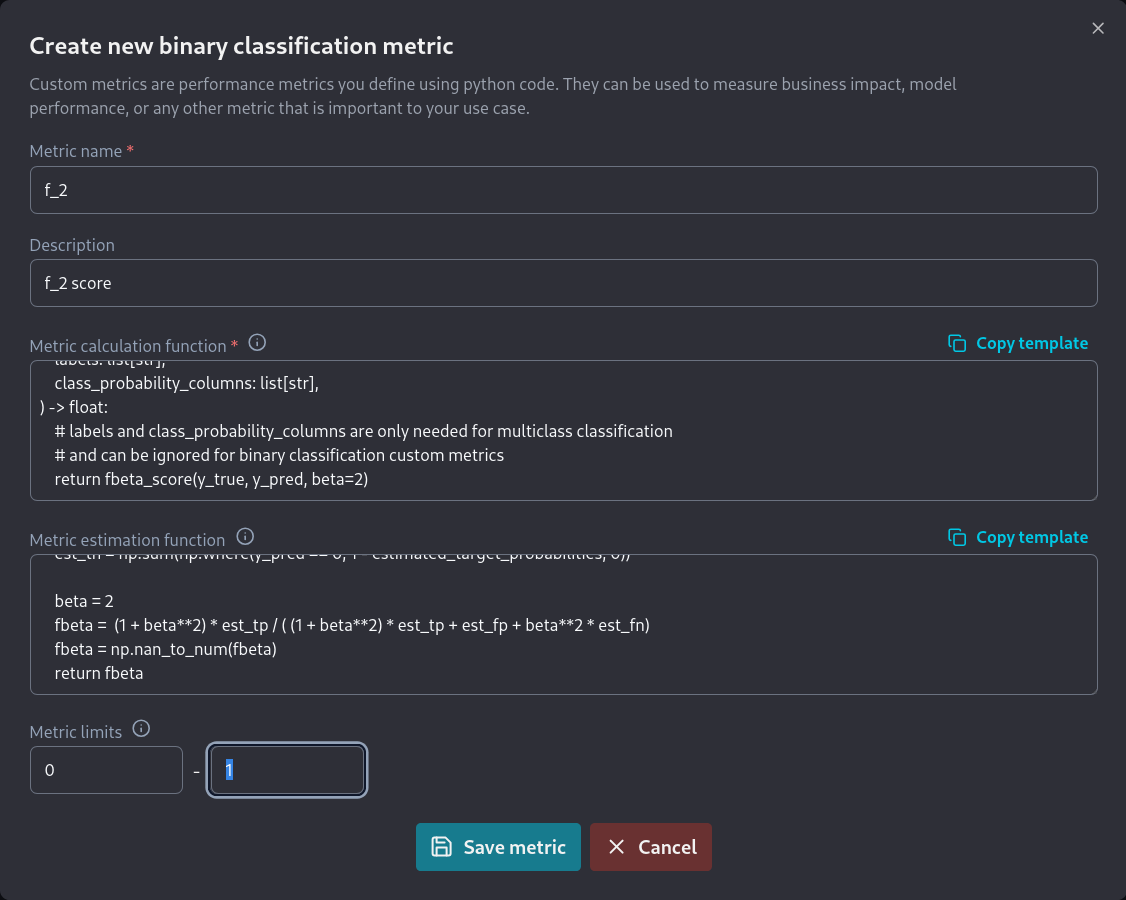
For custom classification metrics, you'll have to provide one function to calculate the realized performance based on your model predictions, targets or any column available in NannyML Cloud. You can optionally provide an estimation function as well, which will then be plugged into our estimation algorithms.
Creating a new custom F2 metric for binary classification
Once the custom metric has been created we'll assign it to our model.
Assigning a custom metric to our model
The next time we calculate the model metrics, the custom metric will be included. You'll be able to see the results in the performance pane of the web application. You can also add it to your model dashboard or use it as a key performance metric!
Enjoy your custom metrics in the performance pane!
We've written a lot of documentation to get you started with custom metrics easily!
Check out the [Creating Custom Metrics](/cloud/v0.24.1/model-monitoring/custom-metrics/creating-custom-metrics.md) guide to help you set up custom metrics for binary classification, multiclass classification or regression models. For a more advanced, real life example you can read the [Advanced Tutorial: Creating a MTBF Custom Metric](/cloud/v0.24.1/model-monitoring/custom-metrics/creating-custom-metrics/advanced-tutorial-creating-a-mtbf-custom-metric.md).
---
# Agent Instructions: Querying This Documentation
If you need additional information that is not directly available in this page, you can query the documentation dynamically by asking a question.
Perform an HTTP GET request on the current page URL with the `ask` query parameter:
```
GET https://docs.nannyml.com/cloud/v0.24.1/miscellaneous/versions/version-0.23.0.md?ask=
```
The question should be specific, self-contained, and written in natural language.
The response will contain a direct answer to the question and relevant excerpts and sources from the documentation.
Use this mechanism when the answer is not explicitly present in the current page, you need clarification or additional context, or you want to retrieve related documentation sections.