> For the complete documentation index, see [llms.txt](https://docs.nannyml.com/cloud/llms.txt). Markdown versions of documentation pages are available by appending `.md` to page URLs; this page is available as [Markdown](https://docs.nannyml.com/cloud/v0.24.2/model-monitoring/custom-metrics/creating-custom-metrics/writing-functions-for-regression.md).
# Writing Functions for Regression
Writing the functions needed to create a custom regression metric.
As we have seen on the Introductory [Custom Metric page](/cloud/v0.24.2/model-monitoring/custom-metrics.md) the key components of a custom binary classification metric are the specific Python functions we need to provide for the custom metric to work. Here we will see how to create them.
We will assume the user has access to a Jupyter Notebook running Python with the [NannyML open-source library](https://github.com/NannyML/nannyml) installed.
## Sample Dataset
We have created a sample dataset to facilitate developing the code needed for custom binary classification metrics. The dataset is publicly accessible [here](https://github.com/NannyML/sample_datasets/tree/main/synthetic_pure_covariate_shift_datasets/regression). It is a pure covariate shift dataset that consists of:
* 7 numerical features: `['feature1', 'feature2', 'feature3', 'feature4', 'feature5', 'feature6', 'feature7']`
* Target column: `y_true`
* Model prediction column: `y_pred`
* A timestamp column: `timestamp`
* An identifier column: `identifier`
We can inspect the dataset with the following code in a Jupyter cell:
```python
import pandas as pd
import nannyml as nml
reference = pd.read_parquet("https://github.com/NannyML/sample_datasets/raw/main/synthetic_pure_covariate_shift_datasets/regression/synthetic_custom_metrics_regression_reference.pq")
monitored = pd.read_parquet("https://github.com/NannyML/sample_datasets/raw/main/synthetic_pure_covariate_shift_datasets/regression/synthetic_custom_metrics_regression_monitored.pq")
reference.head(5)
```
```markdown
+----+------------+------------+------------+------------+------------+------------+------------+----------+----------+----------------------------+
| | feature1 | feature2 | feature3 | feature4 | feature5 | feature6 | feature7 | y_true | y_pred | timestamp |
+====+============+============+============+============+============+============+============+==========+==========+============================+
| 0 | 0.899145 | -2.64707 | 2.80074 | 2.02636 | -2.53157 | -2.12171 | -0.360711 | 7.97047 | 3.15523 | 2020-03-11 00:00:00 |
+----+------------+------------+------------+------------+------------+------------+------------+----------+----------+----------------------------+
| 1 | -1.09015 | -0.442365 | 1.94911 | -0.378131 | 0.517571 | 2.67345 | -1.71358 | -13.5075 | -13.1339 | 2020-03-11 00:01:40.800000 |
+----+------------+------------+------------+------------+------------+------------+------------+----------+----------+----------------------------+
| 2 | 0.619741 | 0.924163 | 1.30714 | 2.60199 | -0.776712 | 1.41447 | -0.848892 | -6.39705 | -5.324 | 2020-03-11 00:03:21.600000 |
+----+------------+------------+------------+------------+------------+------------+------------+----------+----------+----------------------------+
| 3 | -1.7384 | -0.54207 | 1.58942 | 4.12909 | -1.78157 | -0.275194 | -1.82792 | -11.8357 | -3.20461 | 2020-03-11 00:05:02.400000 |
+----+------------+------------+------------+------------+------------+------------+------------+----------+----------+----------------------------+
| 4 | -4.78688 | 0.330358 | -2.56052 | -2.32385 | 1.19089 | -2.58183 | -1.68192 | 4.17999 | 5.68762 | 2020-03-11 00:06:43.200000 |
+----+------------+------------+------------+------------+------------+------------+------------+----------+----------+----------------------------+
```
## Developing custom regression metric functions
NannyML Cloud requires two functions for the custom metric to be used. The first is the `loss` function used to calculate the instance level loss. The second is the `aggregate` function used to aggregate over the instance level results. We are using this decomposition to be able to use the [Direct Loss Estimation](https://nannyml.readthedocs.io/en/stable/how_it_works/performance_estimation.html#direct-loss-estimation-dle) algorithm for performance estimation. In realized performance loss is calculated while in estimated performance loss is estimated.
### Custom Functions API
The API of these functions is set by NannyML Cloud and is shown as a template on the *New Custom Regression Metric* screen.
```python
import numpy as np
import pandas as pd
def loss(
y_true: pd.Series,
y_pred: pd.Series,
chunk_data: pd.DataFrame,
**kwargs
) -> np.ndarray:
pass
def aggregate(
loss: np.ndarray,
chunk_data: pd.DataFrame,
**kwargs
) -> float:
pass
```
Let's use the [pinball metric](https://scikit-learn.org/stable/modules/model_evaluation.html#pinball-loss) as our custom regression metric. We start with creating the `loss` function. Let's describe the data that are available to us to create our calculate function.
* `y_true`: A `pandas.Series` python object containing the target column.
* `y_pred`: A `pandas.Series` python object containing the model predictions column.
* `chunk_data:` A `pandas.DataFrame` python object containing all columns associated with the model. This allows using other columns in the data provided for the calculation of the custom metric
### Custom Pinball metric
We will create a custom metric from the pinball loss. Let's use an `alpha` value of `0.9`. The `loss` function would be:
```python
import numpy as np
import pandas as pd
def loss(
y_true: pd.Series,
y_pred: pd.Series,
chunk_data: pd.DataFrame,
**kwargs
) -> np.ndarray:
y_true = y_true.to_numpy()
y_pred = y_pred.to_numpy()
alpha = 0.9
factor1 = alpha * np.maximum(y_true - y_pred, 0)
factor2 = (1 - alpha) * np.maximum(y_pred - y_true, 0)
return factor1 + factor2
```
The `aggregate` function is quite simpler:
```python
import numpy as np
import pandas as pd
def aggregate(
loss: np.ndarray,
chunk_data: pd.DataFrame,
**kwargs
) -> float:
return loss.mean()
```
We can test those functions on the dataset loaded earlier. Assuming we run the functions as provided in a Jupyter cell we can then call them. Running them we get:
```python
loss = loss(
y_true=reference['y_true'],
y_pred=reference['y_pred'],
chunk_data=reference,
)
aggregate(
loss=_loss,
chunk_data=reference,
)
```
```python
0.6298987071792433
```
We can double check the result with `sklearn`:
```python
from sklearn.metrics import mean_pinball_loss
mean_pinball_loss(y_true=reference.y_true, y_pred=reference.y_pred, alpha=0.9)
```
```python
0.6298987071792433
```
The results match as expected meaning we have correctly specified our custom metric.
## Testing a Custom Metric in the Cloud product
We saw how to add a binary classification custom metric in the [Custom Metrics Introductory page](/cloud/v0.24.2/model-monitoring/custom-metrics.md). We can further test it by using the dataset in the cloud product. The datasets are publicly available hence we can use the Public Link option when adding data to a new model.
Reference Dataset Public Link:
```url
https://github.com/NannyML/sample_datasets/raw/main/synthetic_pure_covariate_shift_datasets/regression/synthetic_custom_metrics_regression_reference.pq
```
Monitored Dataset Public Link:
```url
https://github.com/NannyML/sample_datasets/raw/main/synthetic_pure_covariate_shift_datasets/regression/synthetic_custom_metrics_regression_monitored.pq
```
The process of creating a new model is described in the [Monitoring a tabular data model](/cloud/v0.24.2/model-monitoring/tutorials/monitoring-a-tabular-data-model.md).
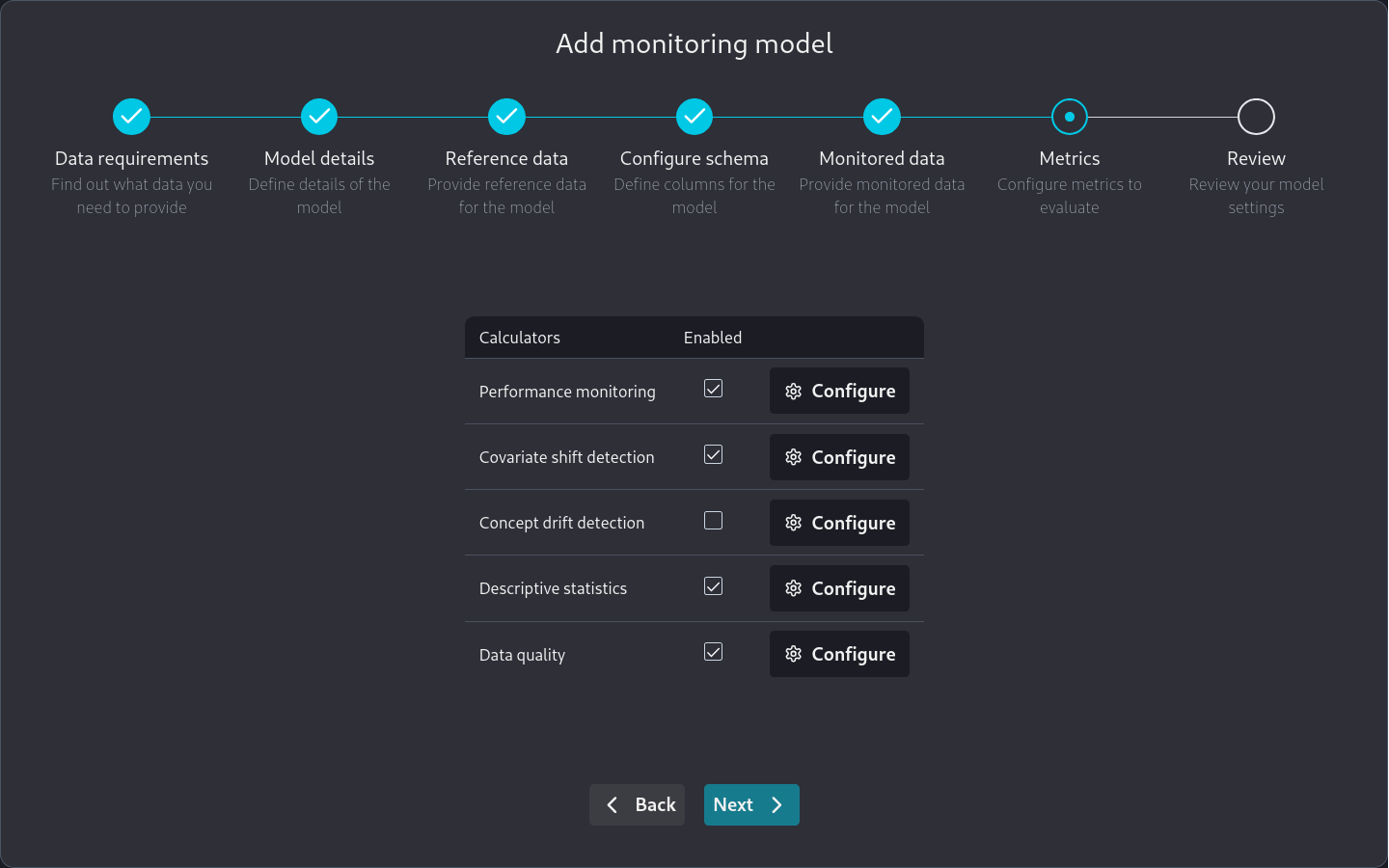
Note that when we are on the **Metrics** page
Metrics page of the Add new model Wizard
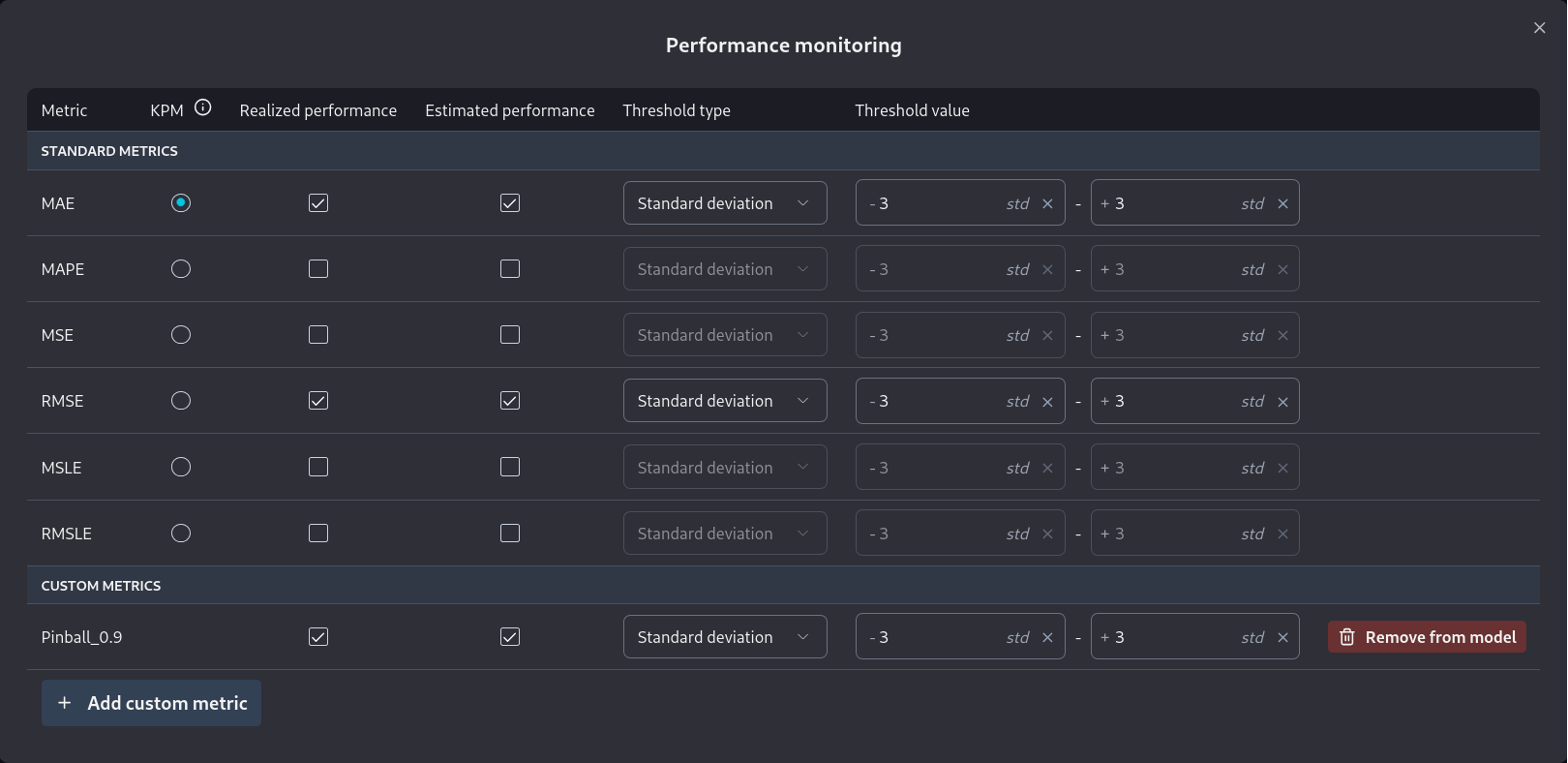
we can go to *Performance monitoring* and directly add a custom metric we have already specified.
Performance settings of the Metrics page of the Add new model Wizard
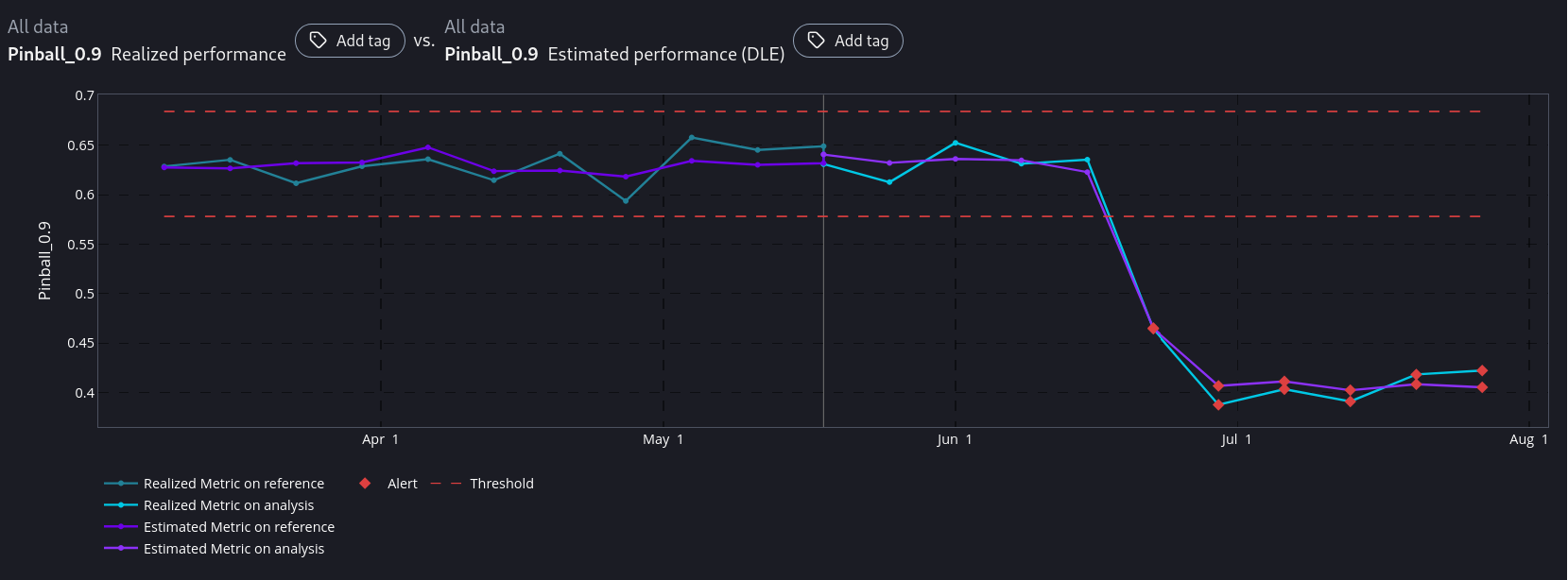
After the model has been added to NannyML Cloud and the first run has been completed we can inspect the monitoring results. Of particular interest to us is the comparison between estimated and realized performance for our custom metric.
We see that NannyML can accurately estimate our custom metric across the whole dataset. Even in the areas where there is a performance difference. This means that our `loss` function is compatible with DLE and we can reliably use both performance calculation and performance estimation for our custom metric.
You may have noticed that for custom metrics we don't have a sampling error implementation. Therefore you will have to make a qualitative judgement, based on the results, whether the estimated and realized performance results are a good enough match or not.
## Next Steps
You are now ready to use your new custom metric in production. However, you may want to make your implementation more robust to account for the data you will encounter in production. For example, you can [add missing value handling](/cloud/v0.24.2/model-monitoring/custom-metrics/creating-custom-metrics/handling-missing-values.md) to your implementation.